
HeyClicky Review UK: Is an AI That Sees Your Screen Worth $20 a Month?
HeyClicky reviewed for UK users: what the hotkey assistant and its agents actually do, the Free, Pro and Max limits, what 25% off the first month through our link saves, where your screenshots and voice go, paying in dollars, and who should stick with the free tier.
Last updated 24 October 2026

Best for
Mac users, and now Windows users, who learn new apps often or want an assistant to run small tasks across Gmail, Calendar and Notion, are comfortable with screenshots going to cloud AI providers on demand, and will test the free tier before paying.
HeyClicky is a voice assistant that looks at your screen only when you press its hotkey, answers out loud, draws on the screen to show you where to click, and can hand bigger jobs to agents that work in your apps. The free tier's 25 talk and 25 agent messages a month are enough to judge it. Through our link the first month of Pro costs $15 instead of $20 (about £11.22 instead of £14.96), or $75 instead of $100 for Max; after that it is full price. The catches: everything is processed in the cloud by Anthropic, OpenAI and others, there's no SOC 2 audit, no terms of service or refund policy on the site, and the product changes weekly. Our call: start free, and pay for Pro only once you are using up the agent messages.
Pros
- 25% off your first month of Pro or Max through our link
- Free tier with 25 talk and 25 agent messages a month and no card needed
- It sees your screen only when you press the hotkey, and raw screenshots are discarded after processing
- Works in any app without plugins, and draws on the screen to point at what to click
- Agents connect to Gmail, Google Calendar, Notion, Linear and Apple's own apps, and can drive your Mac once you approve
- Month-to-month plans you cancel in one click, keeping access to the end of the cycle
Watch-outs
- The discount covers the first month only; full price applies from month two
- Everything is processed in the cloud by Anthropic, OpenAI and other providers, with no SOC 2 or ISO 27001 yet
- No terms of service or refund policy published on the site
- Agent messages are capped (150 a month on Pro) and pause when they run out
- The Windows version only arrived on 23 October 2026
- Priced in dollars, so a UK card may add a non-sterling fee
Current related offer
HeyClicky offer pageAd / referral links — we may earn a bonus when you sign up.
Provider
HeyClicky
HeyClicky is an AI buddy that lives on your Mac or Windows PC — press a hotkey and it sees your screen, walks you through whatever you're working on, or runs agents to do the task for you. Sign up through this referral link and get 25% off your first month of Pro ($20/month) or Max ($100/month). The free tier (25 talk and 25 agent messages a month) costs nothing; the discount applies when you subscribe.
Requirement: A paid Pro ($20/month) or Max ($100/month) subscription — the 25% discount applies to the first month
Easy5 minutes to sign up via the referral linkPayout 25% off applied to your first month when you subscribe to Pro or Max
Verified 24 October 2026
Full claim instructions are on the HeyClicky offer page.
What HeyClicky is and who makes it
HeyClicky is an AI assistant that sits on your desktop. You press a hotkey and talk; it takes a screenshot, works out what you're looking at, answers out loud and draws on the screen to show you where to click. Ask it to do something and it starts an agent that carries the task out in your apps. HeyClicky says more than 25,000 people use it.
It is made by Humansongs, Inc., a San Francisco start-up in Y Combinator's Spring 2026 batch. It runs on Macs with macOS Sonoma 14.2 or later and, since version 1.1.1 on 23 October 2026, on Windows 10 or later. You download it from heyclicky.com rather than an app store: a disk image on the Mac, a setup file on Windows.
How you use it day to day
The core is talk: press the hotkey, ask how to do something in whatever app is open, and HeyClicky walks you through it step by step, drawing in 2D or 3D on the screen; walkthroughs run up to 15 steps. Dictation is included on every plan, with speech in more than 70 languages and dictation in more than 50 with automatic detection.
Since September it also keeps Clickys: persistent agents with their own name, memory and files, which you can give routines by voice, such as a morning summary. It reads whole documents, and you can follow up an agent by holding the voice keys. It is a teacher first and a doer second, which is why talk is unlimited on paid plans and agents are metered.
Agents, integrations and computer use
Say "heyclicky agent" and the task goes to an agent that shows its plan and result in the notch at the top of the screen. Agents connect to Gmail, Google Calendar, Drive and Sheets, Notion, Linear, Apple Notes, Calendar and Reminders, Spotify, Stripe and Meta Ads, and you can add your own MCP connectors; Reddit and Monday were withdrawn because connecting them rarely worked. A Chrome extension lets agents work on sites you are already signed into, without filling password, verification-code or card fields.
Agents can also control your Mac once you approve it. Moving the mouse, talking or pressing Escape takes control back, approving computer use doesn't cost a message, and stopping an agent within 10 seconds doesn't count against your allowance. When unsure, agents ask rather than guess. Give it only the accounts you would hand to a careful temp.
Free, Pro and Max
Free costs nothing and needs no card: 25 talk messages and 25 agent messages a month, plus dictation. Pro is $20 a month for unlimited talk and dictation and 150 agent messages; Max is $100 a month for 1,000 agent messages. When you hit the agent limit, talk keeps working and agents pause until the next cycle.
Yearly billing is 20% cheaper, and the checkout shows the exact yearly price. There is also a team version with shared billing and Pro or Max seats, and students get 50% off their first month of Pro with a school email or student ID. Plans are month-to-month with no lock-in.
What our link gives you
Open our link before you create the account and you get 25% off your first month of Pro or Max on a monthly plan; the link page names us as the referrer and shows the discount. The referral is held in a cookie for up to 60 days, and if you send yourself the download link by email, it carries the referral from your phone to your computer for 60 days too. Clearing cookies or switching browsers before signing up can lose it.
An account can have one referrer, set before its first subscription, and team subscriptions and self-referrals don't qualify. Disclosure: this is BonusRoam's own referral link, so HeyClicky pays us 25% of your plan's list price on each payment for 12 months from your first payment, for example $5 a month on Pro. HeyClicky pays it, not you.
What it costs: a worked example
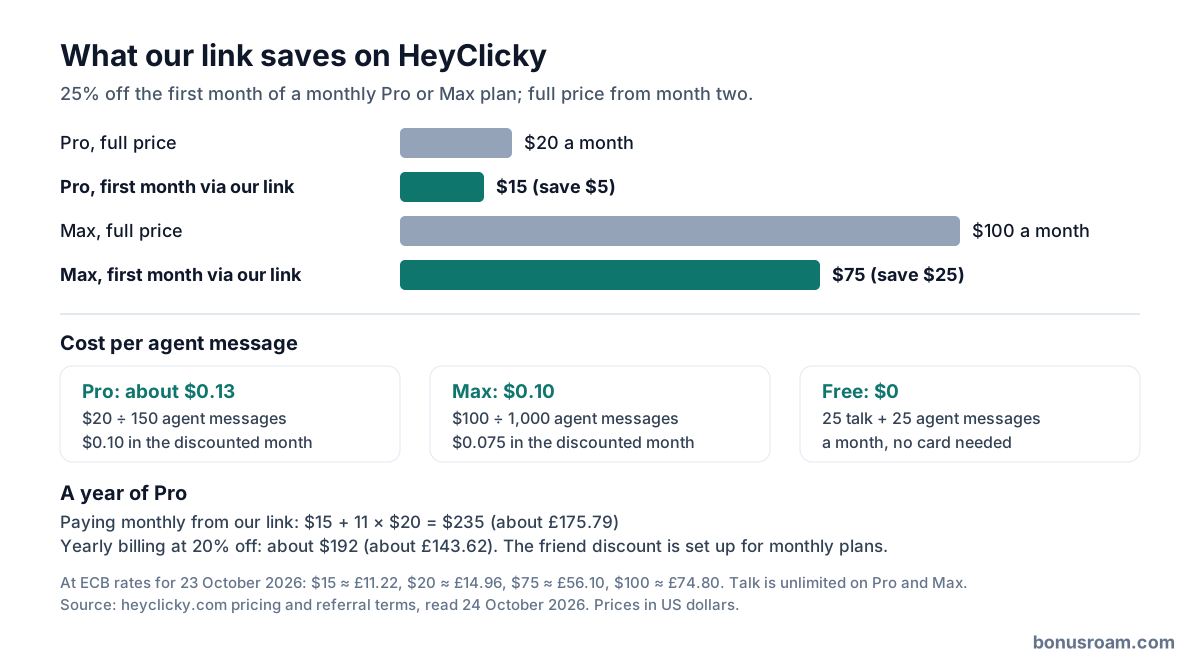
Through our link, the first month of Pro is $15 instead of $20, saving $5 (about £3.74); Max is $75 instead of $100, saving $25 (about £18.70). At the European Central Bank's 23 October 2026 rate, $20 is about £14.96 and $100 about £74.80. Spread over agent messages, Pro works out at about 13 cents each ($0.10 in the discounted month) and Max at 10 cents (7.5 cents).
Over a year, Pro paid monthly from our link costs $235: $15 then eleven months at $20. Yearly billing at 20% off would be about $192, so if you already know you will keep it a year, yearly billing saves more than the one-month discount; the friend discount is set up for monthly plans. Most people should prove the habit on the free tier first, then decide.
What happens to your screen and voice
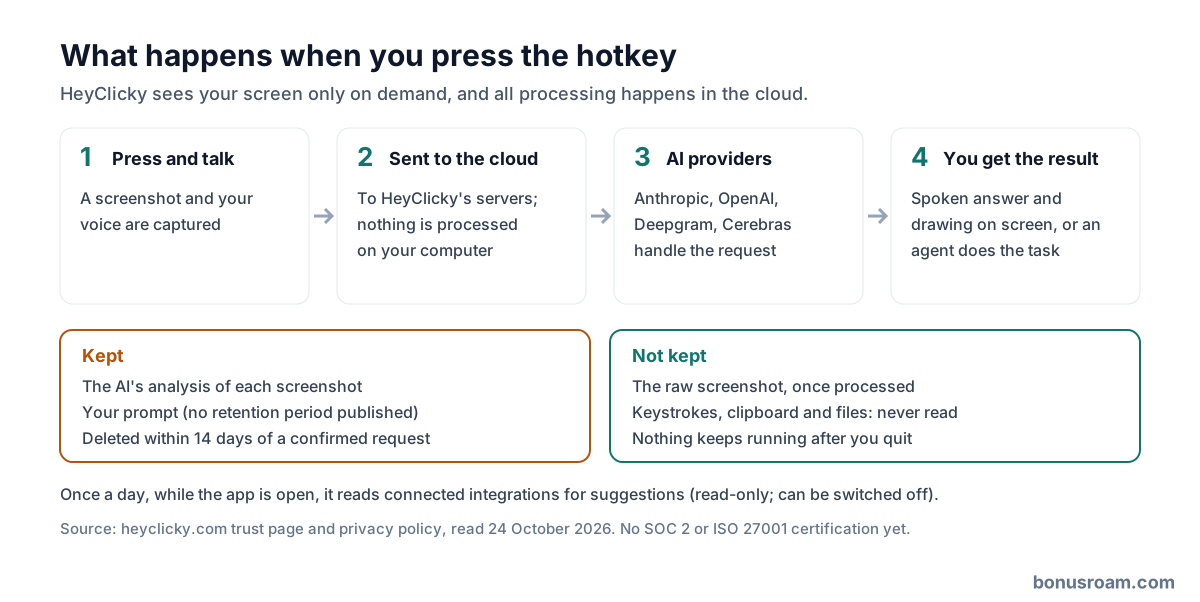
Nothing is captured in the background: HeyClicky says it takes no keystrokes, clipboard, files or screen until you press the hotkey, and nothing keeps running once you quit. When you press it, the screenshot and your voice go to HeyClicky's servers and on to its AI providers, which the privacy policy names as Anthropic, OpenAI, Deepgram and Cerebras; nothing is processed on your computer. Product analytics go to PostHog and crash reports to Sentry, neither of which sees your screen.
Raw screenshots are discarded once processed, but the AI's analysis of each screenshot and your prompt are kept, and no retention period is published. Once a day, while the app is open, it reads your connected integrations for morning suggestions; that is read-only and can be switched off. HeyClicky says it never trains on your data, has no SOC 2 or ISO 27001 certification yet, and deletes your data within 14 days of a confirmed request to [email protected]. Don't press the hotkey with banking, health or client data on screen.
Which AI models it uses
You don't pick a model. Since 24 September 2026 Clickys run on OpenAI's GPT-6 Luna, with GPT-6 Sol for deeper answers, and the realtime voice uses a router that sends quick questions to a fast model and harder ones to a frontier model. Earlier versions used Anthropic's models by default, and dictation uses separate speech-to-text and clean-up models.
That makes HeyClicky a front end to other companies' models with its own interface, memory and integrations on top. The value is the hotkey, the on-screen pointing and the agents wired into your apps, not access to a model you couldn't get elsewhere.
What users run into
There's no store rating to check: HeyClicky is a direct download rather than an App Store app, and on 24 October 2026 it had no Trustpilot page and no reviews on its Product Hunt page, which had 182 followers. Comments there wanted it to take actions rather than just guide, which it now does, and raised unease about an assistant that can see the screen.
Its own changelog shows the recurring fixes: freezes, push-to-talk and Bluetooth microphone problems, agents getting stuck, requests blocked in some regions being rerouted, and connectors that rarely worked being pulled. Expect a young product that changes every week, and check the changelog when something behaves differently.
Paying, cancelling and refunds from the UK
Prices are in US dollars, so a UK card may add a non-sterling transaction fee unless it's a no-fee card, and HeyClicky doesn't say whether VAT is added at checkout. At $20 or $100 a month, Section 75 doesn't apply because it covers single items over £100, so a card chargeback is your fallback if a charge goes wrong.
Cancelling takes one click and you keep access until the end of the cycle. The site publishes no terms of service or refund policy, only referral terms, a trust page and a privacy policy, so don't count on a refund for a part-used month. Account deletion is in the settings, and a deletion request by email is completed within 14 days.
Who should get it, and who should skip it
Get it if you keep learning new software, want an assistant that can actually click through Gmail, Calendar or Notion for you, and are happy for screenshots to go to cloud AI providers when you ask. Start on the free tier; take Pro through our link once you are running out of agent messages.
Skip it if you work with confidential client, health or financial data on screen, need a vendor with a security certification and written terms, or mostly want a chat window, which a general AI subscription already gives you.
FAQ
- What does the HeyClicky link give me?
- 25% off your first month of Pro or Max on a monthly plan: $15 instead of $20, or $75 instead of $100. Open it before creating the account.
- Is there a free version?
- Yes. Free has 25 talk and 25 agent messages a month plus dictation, and needs no card.
- Does HeyClicky work on Windows?
- Yes, since 23 October 2026 on Windows 10 or later. Macs need macOS Sonoma 14.2 or later.
- What counts as an agent message?
- A task you hand to an agent. Talk is unlimited on Pro and Max; approving computer use and stopping an agent within 10 seconds don't count.
- Does it store my screenshots?
- Raw screenshots are discarded after processing, but the AI's analysis of them and your prompts are kept, with no published retention period.
- Does the discount work on yearly plans?
- The friend discount is set up for monthly plans. Yearly billing is 20% cheaper on its own.
- Can I cancel anytime?
- Yes, in one click, and you keep access to the end of the cycle. There's no published refund policy for a part-used month.
- Which AI does it use?
- OpenAI's GPT-6 Luna and GPT-6 Sol for Clickys, a model router for voice, and Anthropic, Deepgram and Cerebras among its providers. You can't choose.