
RoxyBrowser Review UK: What Code GETQUIDS Saves, and the Risks of an Antidetect Browser
RoxyBrowser reviewed: what an antidetect browser does and who needs one, the free plan and banded profile pricing, what invite code GETQUIDS takes off your first purchase and what the invite page's other promises mean, the platform-ban risk, refunds and who should skip it.
Last updated 26 October 2026
Best for
Sellers, agencies, social media managers and developers in the UK who already need several isolated browser profiles, are allowed to run them by the platforms they use, and will pay for a plan anyway.
RoxyBrowser does what an antidetect browser should: each profile gets its own fingerprint, cookies and proxy, and the free plan lets you try it before paying. Code GETQUIDS gets you 20% off your first purchase, which on ten profiles for 30 days takes $8.00 down to $6.40 (about £4.79); the invite page also advertises up to 30% off for life, and the payment summary shows what applies before you pay. That's a useful saving on a purchase you should make only for a real need. The bigger questions sit elsewhere: paid plans are non-refundable once active, and running several accounts often breaks the rules of the platforms involved, with any ban falling on you rather than RoxyBrowser.
Pros
- Code GETQUIDS takes 20% off your first purchase, and the invite page advertises up to 30% off for life
- A permanent free plan with two profiles and API access, no card needed
- Cheap to start: ten profiles cost $8 for 30 days, and longer plans cut that by up to 40%
- Each profile gets its own fingerprint (Canvas, WebGL, fonts, time zone and more), cookies, cache and proxy
- Automation built in: an API, Selenium and Puppeteer support, and an MCP server for AI tools
- Encrypted cloud sync and profile transfer between devices and team members
Watch-outs
- The saving is small in pounds and worth nothing unless you buy something
- The 20% covers your first purchase only, and the up-to-30% lifetime offer has no published conditions
- Paid plans and team seats are non-refundable once active
- Platform bans aren't covered: RoxyBrowser's terms put that risk on you
- Billed in US dollars, so a UK card may add a non-sterling transaction fee
- Desktop only, and its own pages disagree on the free plan and on free proxy IPs
Current related offer
RoxyBrowser offer pageAd / referral links — we may earn a bonus when you sign up.
Provider
RoxyBrowser
Sign up for RoxyBrowser — an antidetect/fingerprint browser for running isolated browser profiles — through this invite and enter code GETQUIDS for 20% off your first purchase. The invite page also advertises up to 30% off for life; the payment summary shows what applies to your order. It is a discount on your spending, not cash back, and there is a permanent free plan so you can test the software before paying anything.
Requirement: No minimum spend to sign up or to use the free plan. The 20% invite discount only has value on your first paid purchase; it shows in the discount breakdown on the payment summary before you pay.
Easy5 minutes to sign up; the discount applies at checkoutPayout The 20% first-purchase discount comes off your checkout total, not paid to you — there is no cash payout to wait for
Verified 26 October 2026
Full claim instructions are on the RoxyBrowser offer page.
What RoxyBrowser is
RoxyBrowser is a Chromium-based antidetect, or fingerprint, browser. Instead of one browser identity it gives you separate profiles, each with its own fingerprint (user agent, screen resolution, time zone, Canvas, WebGL and font readings), cookies and cache, so websites see each profile as a different device. It doesn't change your IP address by itself; you attach a proxy to each profile for that.
It's made by LINKV TECH PTE. LTD. in Singapore, which also lists a Hong Kong company, and its terms are governed by Singapore law. It's software, not a regulated service, so there's no UK regulator or ombudsman behind it. It runs on Windows 10 and 11 and macOS 10.12 or later, with native Apple Silicon support, and RoxyBrowser also lists Linux. There is no mobile app.
Who actually needs one
The genuine users are people who must keep several browser identities apart: agencies running clients' ad and social accounts, sellers with separate shops, testers checking how a site behaves on different devices, and developers automating browsers through RoxyBrowser's API, Selenium or Puppeteer, or its MCP server for AI tools.
If you only want privacy for everyday browsing, you don't need it; a normal browser, plus a VPN where it matters, does that job. RoxyBrowser's own terms also forbid using it for fraud, spam or scraping data illegally.
The free plan
The pricing page lists a permanent free plan with two profiles, two projects, three days of logs and API access at 50 requests a minute, with no card needed. Fingerprint settings are fully customisable even on the free plan, and fingerprint database updates are free.
RoxyBrowser's help pages aren't consistent on the count, and one FAQ says three free profiles. Either way, the free plan is the place to test whether the browser works with your sites before you pay anything.
How the paid pricing works
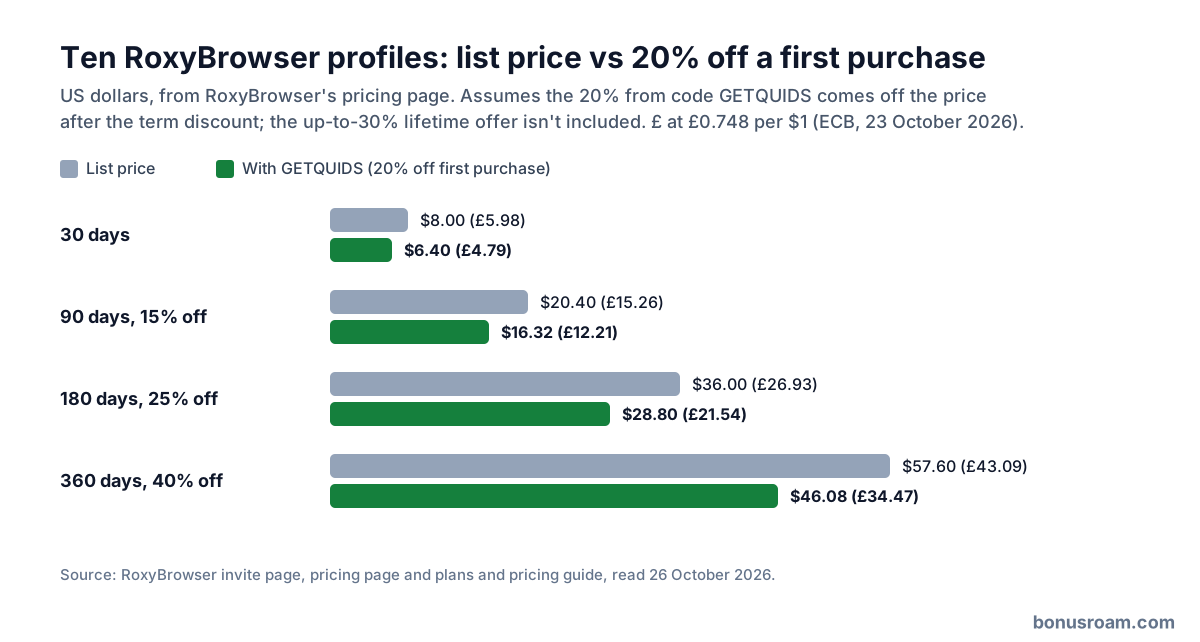
Paid plans are priced per profile in bands: on Basic, $0.80 each for the first 10, $0.25 for profiles 11 to 50 and $0.20 for 51 to 100, falling to as little as $0.03 at the Enterprise end. Above 100 profiles you buy in blocks of 100. Terms run from 1 to 360 days, with 15% off 90 days, 25% off 180 days and 40% off 360 days.
Extras are one-off: $5 per team member seat and $10 per additional team, both permanent. Turning on auto-renewal adds a 7.5% discount on renewals, which take your wallet balance first and then your card. Prices are in US dollars, and you can pay by card, Alipay, WeChat Pay or USDT, among other methods.
The invite code: what GETQUIDS gives you
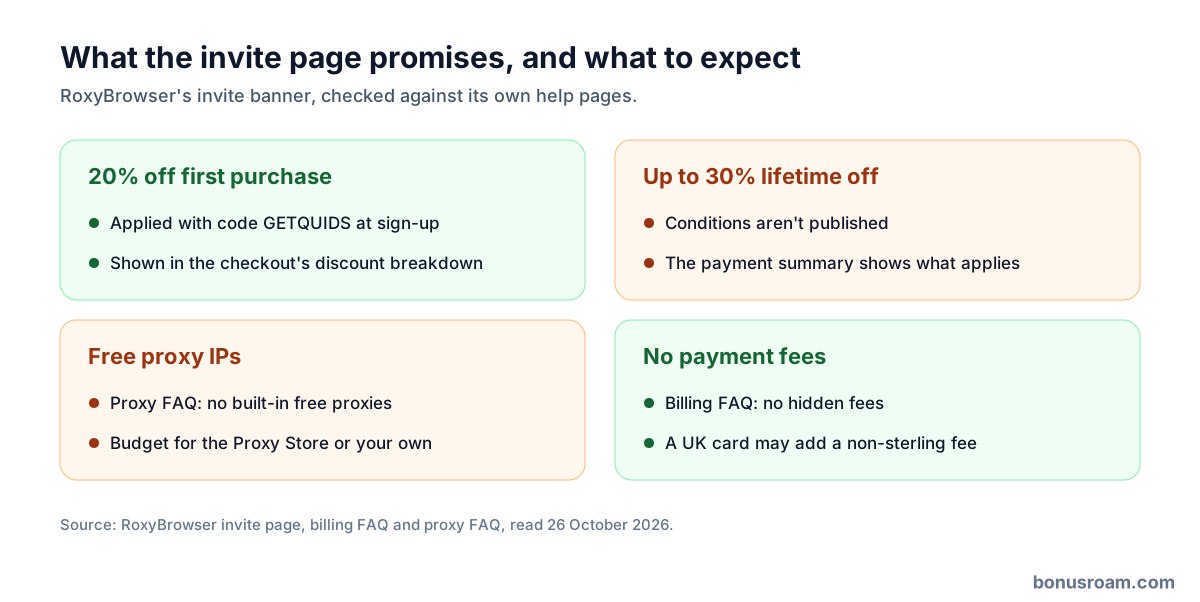
Open RoxyBrowser through our link and enter GETQUIDS in the Invitation Code box on the sign-up form if it isn't already filled in. The invite page promises 20% off your first purchase, and its own price widget shows the effect on ten profiles: $8.00 a month becomes $6.40, a saving of $1.60. It's a discount on your own spending, not cash or withdrawable credit.
The page's headline reads "Sign Up Now for Up to 30% Lifetime Off". RoxyBrowser doesn't publish the conditions behind the 30% or how it combines with the 20%, but the checkout shows a discount breakdown and final price before you pay, so that's where you see exactly what your order gets.
Disclosure: GETQUIDS is BonusRoam's own code, and RoxyBrowser pays us a commission on what you spend. It doesn't add anything to your price.
What 20% off your first purchase is worth
Ten profiles cost $8.00 for 30 days, about £5.98 at the European Central Bank rate of 23 October 2026. With 20% off a first purchase that becomes $6.40, about £4.79, a saving of $1.60 (about £1.20). The discount covers your first order, so it's worth more on a longer first plan: 360 days at 40% off cost $57.60 (about £43.09), and 20% off that saves $11.52 (about £8.62).
The saving grows with the bill, not with your effort: a team buying hundreds of profiles saves real money on its first order, while a solo user saves a few pounds. The free plan already covers testing, so make your first purchase the plan you actually want rather than a short trial. If you wouldn't buy the plan without the code, the code is worth nothing to you.
What the invite page's other promises mean
The invite banner also lists "Free Proxy IPs". RoxyBrowser doesn't say how many, and its proxy FAQ states that it doesn't offer built-in free proxies, so budget for proxies from its Proxy Store or bring your own from another provider. The browser doesn't change your IP address by itself, so each profile needs one.
The banner's "No Payment Fees" matches its billing FAQ, which says there are no hidden fees; a UK card paying in dollars may still add its own non-sterling transaction fee. None of the discount comes back as money either: RoxyBrowser treats plans as digital subscriptions that are non-refundable once activated, and team seats can't be refunded or cancelled.
The risk that matters more than the discount
Platforms such as Amazon, eBay and Etsy restrict one person or business running several accounts, as RoxyBrowser's own pages point out. Its terms say you alone carry the risk of operating on third-party platforms, that it can't promise your accounts won't be suspended, and that it isn't liable for bans, frozen funds or lost business.
RoxyBrowser also says it doesn't support breaking other platforms' terms and may close your account without a refund if it finds you doing so. Before paying, read the rules of every platform you plan to use it on; if they forbid multiple accounts, the browser doesn't make that allowed.
Renewals, expiry and support
If a subscription lapses, your profiles and settings are kept, but you can only launch the first two you created until you renew. Adding profiles mid-term costs the price difference and applies at once; cutting profiles on an auto-renewing plan applies from the next cycle and removes access by creation date, and fixed-term plans can't be reduced.
Support runs by live chat and Telegram from 09:00 to 22:00 Singapore time, which is 1am to 2pm in a UK winter. RoxyBrowser says replies typically come within 60 seconds in those hours.
What users say
RoxyBrowser has no mobile app, so there are no app-store ratings. On Trustpilot on 26 October 2026 it scored 4.3 from 22 reviews, 91% five-star and 9% one-star; most are short five-star posts from accounts with a single review, and RoxyBrowser hadn't replied to the negative ones.
The friction we'd flag is in its own figures: the free plan is two profiles on the pricing page and three in an FAQ, the invite page headline promises up to 30% lifetime off without explaining how, and its free proxy IPs sit beside an FAQ saying there are no built-in free proxies. Trust the payment summary, not the banner.
Who should use it, and who should skip it
Use it if you already need isolated browser profiles for client accounts, separate shops, testing or automation, the platforms involved allow it, and you'd pay for a plan regardless. Start on the free plan, then use GETQUIDS when you upgrade.
Skip it if you only want private everyday browsing, if your plan depends on running accounts a platform forbids, or if you'd only buy because of the discount. On a first ten-profile plan the code saves about £1.20 over 30 days, or £8.62 over 360 days.
FAQ
- What does code GETQUIDS give me?
- 20% off your first purchase from RoxyBrowser, as its invite page promises. It's a discount on your spending, not cash or withdrawable credit.
- What is the "up to 30% lifetime off"?
- It's the headline on RoxyBrowser's invite page. RoxyBrowser doesn't publish the conditions, so check the discount breakdown at checkout, which shows what applies to your order before you pay.
- Is RoxyBrowser free?
- There's a permanent free plan with two profiles and API access and no card needed. You pay only for more profiles, longer logs, higher API limits or team seats.
- How much does it cost?
- Ten profiles cost $8 for 30 days, about £5.98, and longer terms are 15%, 25% or 40% cheaper. Team seats are $5 each, one-off.
- Are the proxy IPs free?
- Don't count on it. The invite banner lists free proxy IPs, but RoxyBrowser's proxy FAQ says it has no built-in free proxies, so plan to buy them from its Proxy Store or use your own.
- Can I get a refund?
- No. Activated plans and team seats are non-refundable, so test on the free plan first.
- Will it stop my accounts being banned?
- It can't promise that. Its terms put the risk of platform bans on you, and some platforms forbid multiple accounts outright.
- Is there a mobile app?
- No. RoxyBrowser runs on Windows and macOS, and also lists Linux; it can imitate Android and iOS browsers from the desktop.