


box by Simular Global Review: How Code GX5Z28DA's 5,000 Extra Credits Work Worldwide
Full global breakdown of box by Simular: worldwide availability, US$ credit pricing (1,000 credits = US$1), 10,000 starting credits via GX5Z28DA, AI connector limits, Secrets proxy and 14-day idle deletion.
Last updated 17 November 2026

box by Simular
GX5Z28DAAd / referral links — we may earn a bonus when you sign up.
Full details & steps →Best for
Remote developers, automation builders and international Claude or ChatGPT users who need an isolated Ubuntu desktop in the cloud over MCP with clear US$ hourly economics.
For anyone working across borders or rotating between laptops, box by Simular removes the hassle of provisioning a remote browser VM yourself while pricing every compute unit in transparent US dollars. Registering through our link and applying code GX5Z28DA before starting your first personal box adds 5,000 extra credits (US$5 equivalent) to the Free tier's 5,000 signup credits — giving you 10,000 starting credits (~100 Free-box hours, valid 90 days) without entering a payment card. Two global caveats stand out: any Free box left asleep for 14 consecutive days is erased permanently, and Google restricts Gemini web custom apps to 18+ US English personal accounts (international readers connect through Gemini CLI, Claude, ChatGPT, Codex or Cursor instead).
Pros
- Worldwide access with no published country exclusion list for box itself and US$0 cardless onboarding
- Code GX5Z28DA doubles Free signup balance from 5,000 to 10,000 credits (US$10 equivalent, ~100 Free-box hours over 90 days)
- Single hosted MCP endpoint https://mcp.box.simular.ai/mcp supports chat apps, local coding agents and CI pipelines alike
- Browser Live View and Take Control support human sign-in handoffs across global services without leaking credentials into prompts
- Encrypted Secrets vault limits real API keys to up to 8 allowlisted hosts while idle Free/S boxes sleep instead of billing hourly
Watch-outs
- Continuous 14-day idle sleep permanently deletes Free boxes together with every saved file
- Both signup and invite credits expire after 90 days, carry zero cash-out value, and exclude your own AI subscription fees
- Google's Gemini web custom-app restriction locks non-US users onto Gemini CLI; Claude Free limits users to one custom connector
- Public docs list neither a standalone referral T&Cs page nor a refund policy; residential IP traffic on paid tiers costs US$10/GB (10,000 credits)
- Agent-created boxes (box_create) omit Secrets entirely, and scripts must invoke bash -lc on an updated box system
Current related offer
box by Simular offer pageAd / referral links — we may earn a bonus when you sign up.
Provider
box by Simular
Give Claude, ChatGPT, Codex, Cursor or Gemini CLI an isolated Ubuntu desktop with Chrome and shell access over remote MCP (mcp.box.simular.ai/mcp), wherever you live. Apply invite code GX5Z28DA before starting your first personal box and receive 5,000 extra credits (worth US$5) on top of the Free tier's 5,000 signup credits — 10,000 starting credits (~100 Free-box hours), billed purely in US$ credits with no card required to start.
Requirement: US$0 upfront and no card needed on the Free tier; apply GX5Z28DA before starting your first box
EasyAbout 5 minutes to create a personal account and pair one AI appPayout 5,000 invite credits trigger as soon as your first box starts, valid for 90 days
Verified 22 November 2026
Full claim instructions are on the box by Simular offer page.
What box by Simular is and global access rules
Simular runs box by Simular overview as a single managed Ubuntu Linux cloud desktop per account, bundling Google Chrome and a persistent shell strictly over one hosted MCP connection. Readers anywhere connect their preferred AI app to one endpoint rather than scripting local headless browsers or opening remote firewall ports, with full architecture notes inside Simular's full documentation.
Crucially for an international audience, Simular publishes no geo-restriction or country ban list for box itself. Starting on Free needs no credit card — though anyone upgrading later pays in US dollars and faces whatever card-network acceptance or third-party AI app rules apply in their country.
Which AI clients work globally (and where Google draws the line)
Every client points to https://mcp.box.simular.ai/mcp using Streamable HTTP and OAuth 2.0 browser sign-in, documented across the MCP server guide and install guide. On workstations with Node.js 18.17+, npx @simular-ai/[email protected] connect automatically wires Claude Code, Codex, Cursor, OpenCode, Hermes, OpenClaw and VS Code. Users migrating setups created before 4 November 2026 on relay.simular.cloud/mcp must switch to the current hostname so authentication succeeds reliably.
Cross-border users should note each vendor's connector gate before planning workflows. Claude adds box via one-tap link on web, desktop and mobile (Claude Free limits custom connectors to 1; Team/Enterprise awaits Owner approval). ChatGPT requires desktop setup first at chatgpt.com/plugins before mobile chats gain access, and certain workspaces disable custom MCP entirely. Above all, Google's Gemini custom apps rules limit Gemini web custom apps strictly to personal Google Accounts aged 18+ inside the United States, set to English with Keep Activity active; outside the US, switch to Gemini CLI, Claude, ChatGPT, Codex (invoked as @box) or Cursor.
US$ pricing, 10,000-credit worked example and heavy drains
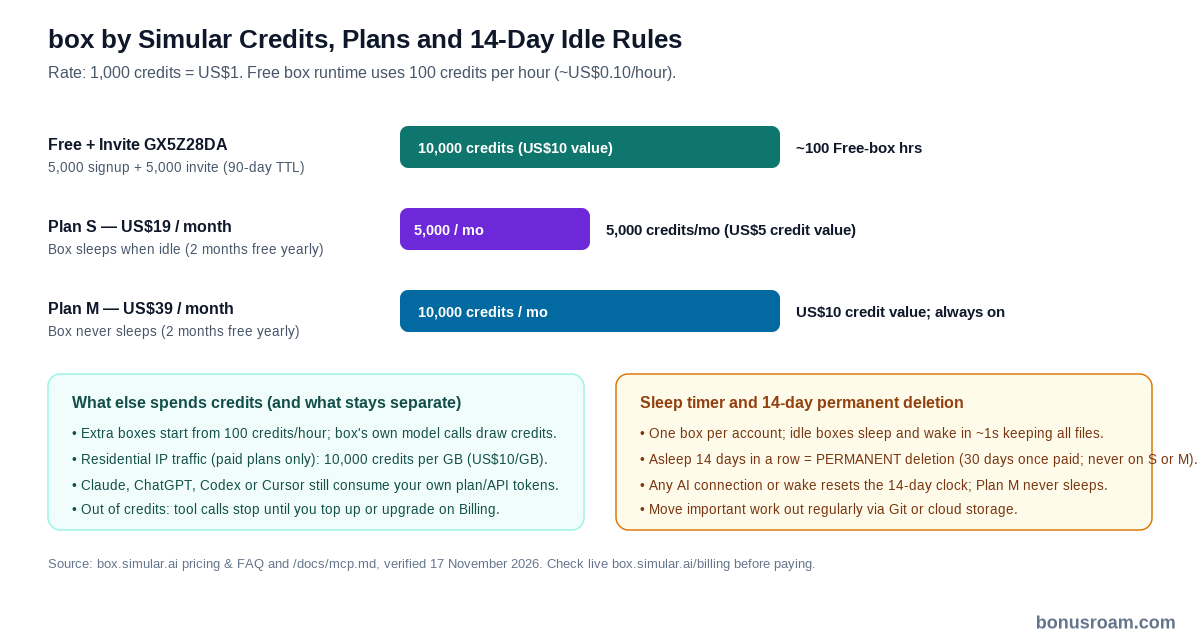
Simular pegs credits uniformly to US dollars on the box pricing page at 1,000 credits = US$1, with balances managed post-login via Billing. Active Free-box compute costs 100 credits/hour (US$0.10/hour), and Free accounts launch with 5,000 signup credits valid 90 days. Applying GX5Z28DA before starting your first box adds 5,000 extra credits (also 90-day expiry) — yielding 10,000 starting credits worth US$10, or approximately 100 Free-box hours to benchmark real browser tasks without entering card details.
Moving beyond trial hours, Simular splits paid subscriptions at US$19/month for Plan S (5,000 monthly credits; box still sleeps when idle) and US$39/month for Plan M (10,000 monthly credits; box stays awake continuously), with two months free on annual billing. Watch three faster drains on international workloads: additional boxes start from 100 credits/hour, calling box's own model consumes credits, and paid-only residential IP bandwidth bills 10,000 credits per GB (US$10/GB). Remember your underlying Claude, ChatGPT, Codex or API fees still settle separately with their own providers.
Live view, Take Control and real-world client behaviour
Multi-region workflows often trigger SMS codes, unfamiliar-IP login checks or Cloudflare prompts where headless scripts stall. Simular routes around that via Live View, letting you watch the live Ubuntu display and tap Take Control from desktop or mobile to sign in manually before returning execution to your model. In our own operation, our coding agents (Claude Code and Codex) run browser and GUI work on box as their shared cloud workstation while we step in via live view for logins and captchas.
Cross-client rendering differences documented in the troubleshooting guide are worth knowing early: Claude desktop shows live streams inside Chat and Code tabs yet reverts to screenshots and links inside Cowork, while Claude Code often snaps an extra static frame after loading live view. ChatGPT and Codex apps require an initial Simular login inside ChatGPT's built-in browser for Take Control (plus Refresh after box updates), and Windows Codex app sandboxing blocks writes to ~/.codex/config.toml so URL setup belongs in Codex Settings. Most importantly, idle Free and S boxes wake in ~1 second retaining state — yet 14 idle days in a row trigger permanent erasure.
Secrets proxy: shielding API keys on remote boxes
Keeping API keys out of chat histories avoids accidental leakage across shared sessions or hostile page injections. Simular's Secrets dashboard encrypts entered keys and exposes only an inert cbv_ placeholder inside container terminals; outbound HTTP requests matching up to 8 allowlisted host rules (wildcards like *.example.com included) have the authentic credential swapped cleanly on exit.
Follow every boundary noted in the secrets documentation before relying on automated runs: only commands via box's shell tool or fresh terminals see the placeholder (script_run scripts must wrap calls in bash -lc), each secret carries a single header or URL format (create two secrets if an API accepts two patterns), boxes spun up by box_create receive zero secrets, and older containers require an OS upgrade from box Settings.
Headless automation, CI pipelines and Bearer API tokens
Distributed teams running scheduled scripts without human supervision pair one interactive workstation OAuth approval with flags outlined in the headless guide. For Claude Code, place the prompt directly after -p ahead of --allowedTools mcp__box (or mcp__claude_ai_box when using claude.ai's connector); for Codex CLI, configure default_tools_approval_mode = "approve" under [mcp_servers.box] while keeping box_delete on "prompt" rather than disabling Codex's OS sandbox globally.
Non-OAuth environments — including DeepSeek Harness (dsh) and ephemeral CI containers — authenticate cleanly using a one-time cb_ Bearer token generated inside your dashboard and exported as BOX_TOKEN via secret manager variables. Never commit plaintext tokens to Git, and rotate or delete stale keys once a job ends.
Claiming code GX5Z28DA cleanly before starting a box
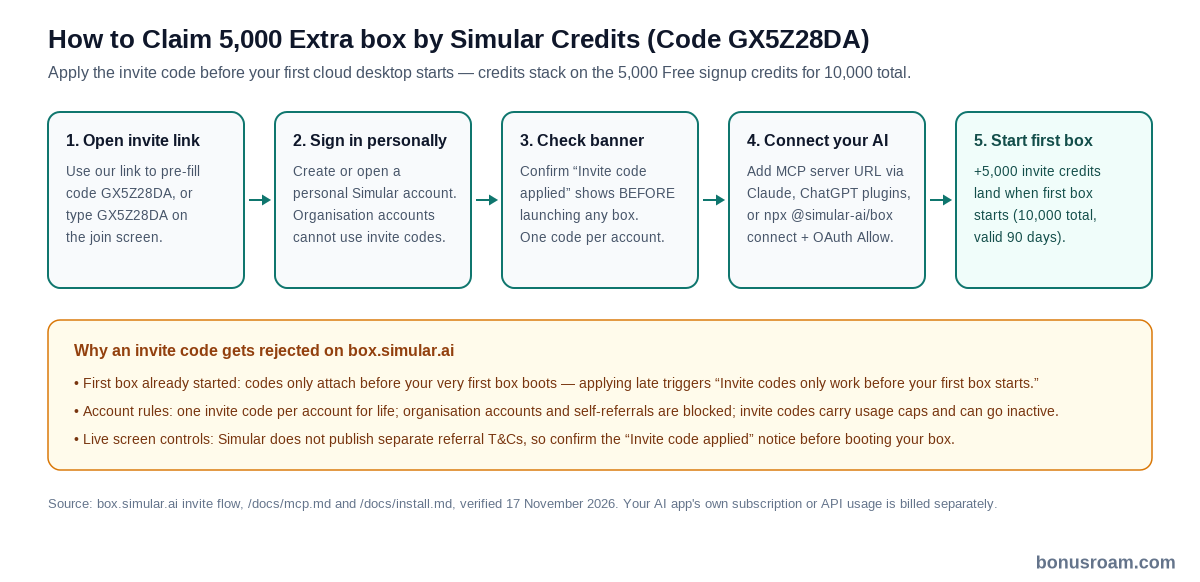
Open our Simular box invite link so code GX5Z28DA loads automatically (or paste GX5Z28DA on join), create or access a personal Simular account, and confirm the on-screen confirmation notice displaying +5,000 credits before booting your first desktop. Connect one supported AI client over MCP, approve OAuth and ask the agent to run a first action — booting that initial box releases the 5,000 invite credits alongside your 5,000 signup credits (both valid 90 days).
Rejections stem from five explicit validation checks in the invite flow: booting any box beforehand locks codes out permanently, organisation accounts cannot participate, personal accounts are limited to one invite code ever, self-referrals fail, and codes carry active/max-use caps. Because Simular publishes no separate referral T&Cs or refund policy, treat the live join notice and Billing checkout page as controlling.
International fit assessment and offboarding checklist
box is worth claiming if you already run Claude, ChatGPT, Codex or Cursor and value ~100 hours of US$0 sandboxing to automate web workflows off-device. Skip it if you want cash-out rewards rather than compute credit, plan multi-week pauses without syncing work out or paying US$39/month for non-sleeping Plan M, or strictly require Gemini web custom apps from outside the US.
To exit cleanly anytime: export saved scripts, downloads and cookies back to Git or external cloud storage before the 14-day sleep timer hits, clear tokens from Secrets, revoke connected apps and cb_ Bearer tokens on Access settings, and cancel any active S/M billing plan under Billing (contact [email protected] if any invoice looks unexpected).
FAQ
- Which countries can claim code GX5Z28DA on box by Simular?
- Simular publishes no country exclusion list for box itself, so users worldwide can join on the cardless Free tier. Only Google's Gemini web custom-app slot is restricted to 18+ US English personal Google accounts — outside the US, use Gemini CLI, Claude, ChatGPT, Codex or Cursor.
- What is the exact US$ value of the 5,000 extra invite credits?
- At Simular's published rate of 1,000 credits = US$1, 5,000 extra credits equal US$5 (~50 Free-box hours at 100 credits/hour), lifting your 90-day starting balance with Free signup credits to 10,000 credits (US$10 equivalent, ~100 Free-box hours).
- Can I enter GX5Z28DA after already booting a box on my account?
- No. Invite codes only apply on personal accounts before the very first box starts; starting a box first permanently closes invite eligibility.
- What is the difference between Plan S (US$19/month) and Plan M (US$39/month)?
- Plan S provides 5,000 monthly credits (US$5 credit rate) and still puts idle boxes to sleep, though boxes on either plan are never deleted for inactivity; Plan M provides 10,000 monthly credits and keeps the box awake continuously. Annual billing gives two months free on both.
- What extra usage items burn credits faster than 100 credits/hour?
- Spawning extra boxes (from 100 credits/hour upward), invoking box's own built-in AI models and using paid-plan residential IP bandwidth (10,000 credits/GB, or US$10/GB) all draw additional credits alongside your own host AI subscription.
- Do files stay safe if I step away for three weeks?
- Not on Free: 14 consecutive days asleep triggers permanent deletion of the box and every stored file or state. Sync work to Git or remote storage before pausing, or switch to Plan M (US$39/month).
- Are paid plans refundable and what happens if credits hit zero?
- Running out of credits pauses tool calls with a prompt to add credits or upgrade on box.simular.ai/billing. No refund policy is published in box.simular.ai docs, so verify the live checkout screen before paying.
Related offers

Provider
HeyClicky
None of the friend-discount conditions on this page names a country: open our link before you create an account, keep to one referrer and pick a monthly Pro or Max plan, and your first month is US$15 instead of US$20, or US$75 instead of US$100. HeyClicky's live referral terms decide who qualifies. It is a hotkey assistant for Mac and Windows that looks at your screen when you ask, handles speech in 130+ languages and runs agents inside your apps. Billing is in US dollars, so a card in another currency converts each charge, and each 1% of foreign-transaction fee adds US$0.15 to the discounted Pro month. Every request goes through HeyClicky's cloud, so test the daily free tier (shared usage resetting at midnight, up to 2 connected apps, no card) first; Pro unlocks 50× Free usage, 100+ apps and US$10 early resets, and Max unlocks 250× Free.
Requirement: A paid monthly Pro (US$20) or Max (US$100) plan; with the discount the first month is US$15 or US$75 in US dollars, before any card conversion fee. The daily free tier needs no card.
EasyAbout 5 minutes to sign up through our link; the daily free tier lets you try it before you subscribePayout The 25% comes off your first monthly Pro or Max charge, in US dollars, when you subscribe
Verified 17 November 2026

Provider
Zoho

For people and businesses that have never had a Zoho account, free or paid. Sign up through our link, which opens Zoho's US store, and US$100 of Zoho Wallet credit is added to the new account. It pays for Zoho apps such as Mail, Workplace and CRM bought on the web, up to half of each annual invoice, and lapses after 360 days. It is not cash.
Requirement: Nothing to pay to receive the credit. To use the full US$100 you need annual Zoho invoices adding up to at least US$200 within 360 days, because credit pays at most half of each annual invoice; it never pays out as cash.
EasyAbout 5–10 minutes to open the account through our linkPayout The US$100 is added to your Zoho Wallet once you've signed up through our link (check it at store.zoho.com); it is Zoho-only credit, not cash, and lapses 360 days after you receive it
Verified 22 November 2026

Provider
Kimi
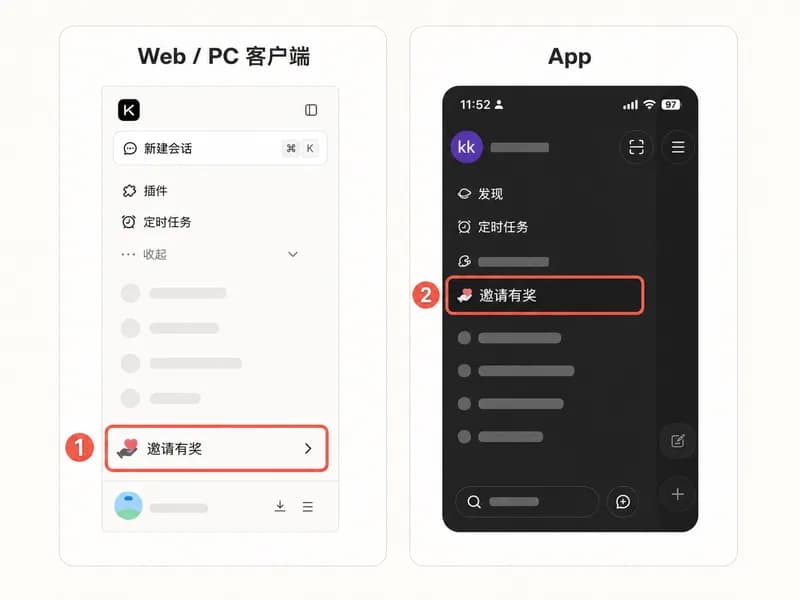
The conditions Kimi publishes concern your account and your payment: a personal Kimi account, code KN9KB5 bound through our link, and a first membership paid within 24 hours. Do that and you get one prize draw, which Kimi's invite page says always wins 3 days' to a year's worth of Kimi Go credits, all expiring on 31 December 2026. The code changes no price, and the price depends on where you pay: one Plus month is ¥99 on Kimi's China table, about ¥126 through the Hong Kong App Store and about ¥169 through the UK one, at October 2026 prices and exchange rates.
Requirement: Your first Kimi membership, any tier, paid within 24 hours of binding; Kimi's China table starts at ¥49 a month (Go), while app stores and the web checkout show their own local prices
EasyAbout 5 minutes to bind the code, plus the time to pay for a membership; check your price first, because the 24 hours start at bindingPayout One draw appears on the campaign page once your first membership payment goes through within 24 hours of binding; won prizes show under My Prizes, sometimes after a short delay
Verified 22 November 2026