

Wispr Flow Review UK: Is AI Dictation Worth £15 a Month, and What Does the Free Pro Month Give You?
Wispr Flow reviewed for UK readers: what the voice-dictation app does on Mac, Windows, iPhone and Android, the Free plan's weekly word limits, Pro prices in pounds, the 30-day Pro trial with code JIMMY146, the privacy settings to check and who should skip it.
Last updated 24 October 2026

Best for
People in Britain who write a lot on a computer or phone (emails, reports, Slack messages, prompts for AI tools) and want to try talking instead of typing, including anyone with RSI or who simply thinks faster than they type.
Wispr Flow is a polished cloud dictation app: you speak, and tidy text appears in whatever app you are using, without the ums and in more than 100 languages. The Free plan allows 2,000 words a week on a Mac or PC before it slows down, which a heavy writer gets through in a couple of days, so the real question is whether Pro is worth £15 a month on the UK App Store, or £143.99 a year. Code JIMMY146 stretches the standard 14-day Pro trial to 30 days at sign-up, which is long enough to find out on your real work. Check the data settings on day one, and only pay if you are still dictating every day in week four.
Pros
- Code JIMMY146 gives a 30-day Pro trial at sign-up, against the standard 14 days
- Types straight into any app on Mac, Windows, iPhone and Android, with filler words and false starts cleaned up
- Dictates in more than 100 languages on every plan, the Free plan included
- A usable Free plan afterwards: 2,000 words a week on a Mac or PC, with no time limit
- Training on your dictations can be switched off, and Wispr holds SOC 2 Type II and ISO 27001 certification
- Rated 4.8 from about 2,700 ratings on the UK App Store
Watch-outs
- Transcription always happens in Wispr's cloud, so there is no offline mode and your audio leaves the device
- Pro costs £15 a month or £143.99 a year on the UK App Store once the trial ends
- The Free plan slows down after 2,000 desktop words a week and stops at 5,000 until the Sunday reset
- The iPhone keyboard needs Full Access, and dictating in other apps hops you into the Flow app first
- No Linux, iPad or Windows-on-Arm version
- Wispr publishes no general refund policy, so cancel before a renewal rather than after
Current related offer
Wispr Flow offer pageAd / referral links — we may earn a bonus when you sign up.
Provider
Wispr Flow
Sign up for Wispr Flow through referral code JIMMY146 and get a 30-day Pro trial, normally double its standard 14-day trial. The trial is granted at sign-up, with no word count to reach first.
Requirement: The 30-day Pro trial is applied at sign-up.
Easy5-10 minutesPayout 30-day Pro trial starts at referred sign-up
Verified 24 October 2026
Full claim instructions are on the Wispr Flow offer page.
What Wispr Flow is
Wispr Flow is a dictation app from Wispr AI, Inc. that works across your whole device rather than inside one program. You hold a shortcut (or switch to hands-free), speak, and the text lands wherever the cursor is: Gmail, Outlook, Slack, Google Docs, WhatsApp, ChatGPT or a code editor. It strips out ums and ahs, follows corrections you make mid-sentence ("5pm, no actually 6pm" comes out as 6pm), learns names and jargon into a personal dictionary and expands snippets you set up.
It runs on Mac, Windows, iPhone (as a keyboard) and Android (as a floating Flow Bubble). Mac and Windows also get a meeting Notetaker that records on your device without sending a bot into the call. Every dictation is transcribed in Wispr's cloud, so Flow needs an internet connection and does nothing offline.
The 30-day Pro trial with code JIMMY146
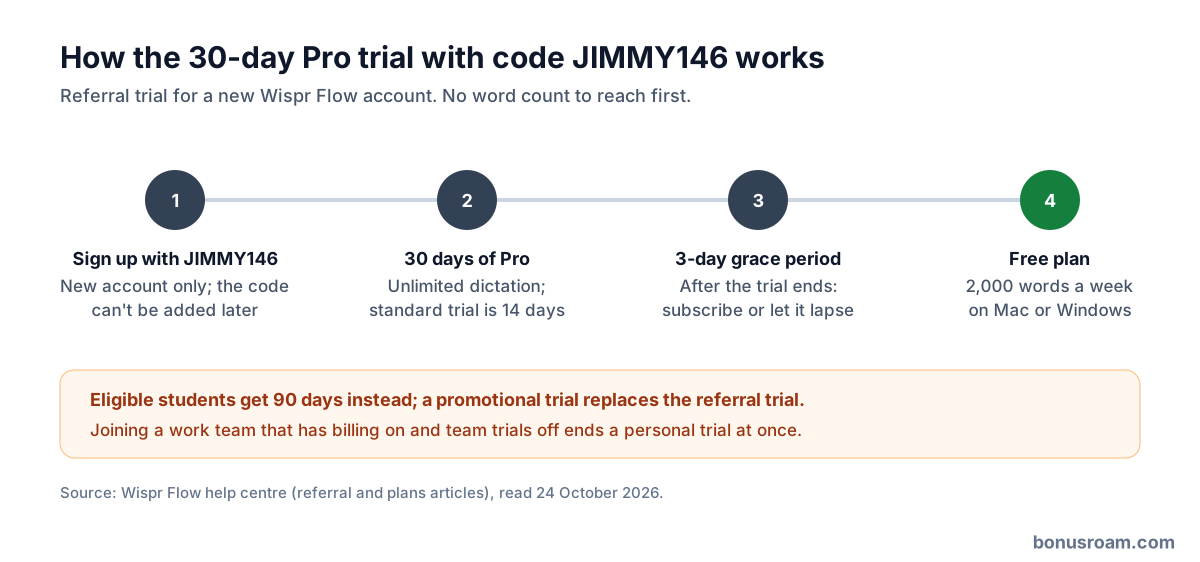
Create a new account through our link, or enter code JIMMY146 at sign-up, and Wispr applies a 30-day Pro trial straight away instead of the standard 14 days. There is no word count to hit first. Each account can have one referrer, set when the account is created and never replaced, so the code has to go in at sign-up rather than later.
A few cases change the length. A promotional trial overrides the referral trial; students who qualify get 90 days instead; and accounts on the free Student plan get no trial. Joining a team can also end it: if your employer's Wispr team has live billing with team trials switched off, accepting the invite ends your personal trial at once and makes you billable, so finish the 30 days before you join.
Wispr's help centre doesn't ask for a payment card for the referral trial. If a checkout screen ever appears, go ahead only if it shows nothing due today. Disclosure: JIMMY146 is BonusRoam's own code, so we receive a month of Pro credit once your account qualifies, which happens when you have dictated 2,000 words in total or have a personal plan that is active or on trial.
Free and Pro compared
The Free plan is not a teaser: it dictates in any app, in every supported language, with the personal dictionary and snippets. The limit is volume. On a Mac or PC you get a 2,000-word weekly allowance, after which Flow slows down, and a 5,000-word maximum, after which dictation stops until the reset at midnight Pacific time on Sunday (8am on Sunday in the UK). The phone apps are tighter: 550 words with a 750 maximum on iPhone, and 1,000 with a 1,500 maximum on Android, resetting at 23:45 UTC on Sunday.
Pro removes the word limits and raises the Notetaker's meeting allowance and history, adds priority support and early features, and brings team tools such as a shared dictionary, snippets and central billing. The Growth plan at $23 or $33 per user a month (US list prices) adds single sign-on, per-user reports and HIPAA enforcement under a signed agreement, which only matters to organisations.
What Pro costs in the UK
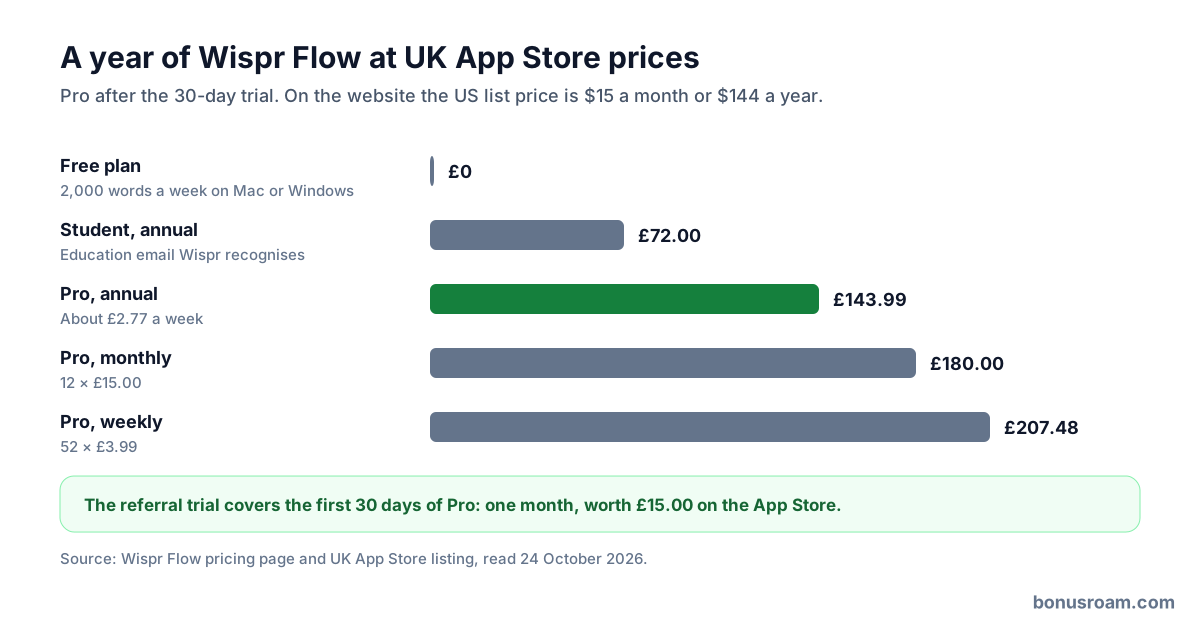
On the UK App Store, Pro costs £15.00 a month, £143.99 a year or £3.99 a week, and the student plans £7.49 a month or £72.00 a year. On its own website Wispr sets fixed local prices in 24 currencies, chosen by the country you connect from rather than your billing address, so a VPN can switch you to US dollars. Its US list price is $15 a month or $144 a year, and annual billing is pitched as 20% cheaper. Existing subscribers keep the price they signed up at.
Where you pay decides where you cancel: the Stripe billing portal from the desktop app, Apple's subscription settings on an iPhone, or the Play Store on Android. Students and educators get 50% off Pro with an education email that Wispr recognises; its help centre talks about .edu addresses, and anyone it doesn't accept sees "Student plans only available for .edu email addresses".
What the free month is worth
The referral trial is worth one month of Pro: £15 at the UK App Store price, and 16 days more than anyone gets without a code. It only turns into money saved if you go on to keep Pro, so the useful sum is the year after. Twelve monthly payments on the App Store come to £180.00, the annual plan to £143.99 (£36.01 less, about £2.77 a week), and the weekly plan would cost £207.48 over a year.
Take someone who writes about 1,200 words a working day across email, Slack and documents, so 6,000 a week. On the Free plan they would hit the slowdown on Tuesday and the 5,000-word stop by Friday, so Free doesn't work for them and the trial tells them whether £143.99 a year is worth it. Someone who dictates 1,500 words a week stays inside the Free allowance and has no reason to pay at all.
Privacy and your data
Because transcription always happens in the cloud, what Wispr keeps is set in Settings, then Data and Privacy. One switch decides whether your audio, transcripts and edits may be used to train AI models (it used to be called Privacy Mode); another, Dictation Cloud Storage, decides whether transcripts, audio and dictation history are stored on Wispr's servers for cross-device history. Turn both off if you dictate anything sensitive. Wispr still collects usage statistics such as word counts whatever you choose, and pressing thumbs up or down sends that session's audio and transcript, which staff may review.
Wispr says it encrypts data in transit and at rest, holds SOC 2 Type II and ISO 27001 certification, has zero-data-retention agreements with the AI providers behind dictation and never sells your data. HIPAA-ready handling under a signed agreement is a Growth-plan feature. If your employer restricts cloud tools, ask before dictating client or patient details on a personal account.
Devices, setup and languages
Flow needs macOS 12 or later (with separate Apple silicon and Intel downloads), Windows 10 or 11 on an x64 processor with 8GB of RAM recommended, iOS 18.3 or later, or Android 13 or later. Windows on Arm, including Snapdragon laptops, Linux and the iPad aren't supported. Setup takes a few minutes: install, sign in through the browser, grant the microphone (plus Accessibility on a Mac), test the mic, pick push-to-talk or hands-free and choose your languages.
On iPhone you add Wispr Flow as a keyboard and turn on Allow Full Access; on Android it needs microphone, Accessibility and display-over-other-apps permissions, and without Accessibility it can't insert text. Wispr warns about fake Android apps: the real one is called Wispr Flow (not Whisper Flow) and its package name is com.wispr.flowapp.
Flow detects one language per dictation, not per word, so selecting only the languages you actually speak keeps it from guessing. With Chinese and English both selected, English words can come out in Chinese characters or the other way round.
What users complain about
On 24 October 2026 the iPhone app was rated 4.8 from about 2,700 ratings on the UK App Store, and the Android app 4.6 from about 12,800 reviews on Google Play. Reviewers mostly describe it as much faster than typing and accurate enough to skip proofreading, and one calls it a game changer for ADHD.
The complaints are consistent: on iPhone the keyboard switches you into the Flow app to record before returning, which reviewers call clunky; some are uneasy about granting a keyboard Full Access; unusual names and place names need adding to the dictionary; and voice commands are hard to discover because there is no list of them. Android users note that in some fields the text goes to the clipboard instead of being typed.
When the trial ends, and cancelling
When the 30 days run out you get a three-day grace period, then the account drops to the Free plan unless you have subscribed. Your data is kept. Upgrades on a card take effect immediately with proportional billing, while downgrades apply at the end of the billing period; switching between monthly and annual billing can reset the cycle and lose prepaid time.
To cancel, use Plan and Billing in the desktop app (the Stripe portal), or the App Store or Play Store if you subscribed there. Wispr's help centre has no general refund policy, so set a reminder a few days before any renewal. Changing a subscription's currency goes through support and restarts the plan at the new currency's list price.
Who should try it, and who should skip it
Try it if you write for a living or spend hours a day in email, Slack and documents, if typing hurts, or if you write long prompts for AI tools: 30 days is plenty to learn whether speaking suits you, and the Free plan is a real fallback afterwards. Students should check whether their university address qualifies first, because the student trial is 90 days.
Skip it if you need dictation to work offline or on an iPad, Linux or an Arm-based Windows laptop, if your employer bars sending audio to cloud services, or if you write fewer than 2,000 words a week on a computer, since the Free plan already covers you.
FAQ
- What does code JIMMY146 give me?
- A 30-day Pro trial on a new account, applied at sign-up, instead of the standard 14 days. Eligible students get 90 days.
- Do I have to dictate a set number of words first?
- No. The 30 days start when the account is created; there is no word target.
- Can I add the code after signing up?
- No. Each account has one referrer, set at sign-up and never replaced, so use our link or the code when you create the account.
- What happens when the 30 days end?
- A three-day grace period, then the Free plan unless you subscribe. Your data is kept.
- How much is Pro in the UK?
- £15.00 a month or £143.99 a year on the UK App Store. The website shows a fixed local price for the country you connect from; the US list price is $15 or $144.
- Does Wispr Flow work offline?
- No. Every dictation is transcribed in Wispr's cloud, so you need a connection.
- Is my voice used to train Wispr's models?
- Only if the training switch in Settings, then Data and Privacy, is on. Turn off Dictation Cloud Storage too if you don't want transcripts and audio kept on Wispr's servers.
- Is there a student discount?
- Yes, 50% off Pro for students and educators with an education email Wispr recognises; on the UK App Store the student plan is £7.49 a month or £72.00 a year.